By Fahad Khatri ·
What Is Observability? Metrics, Logs, Traces & Tools
Learn what observability is, why it matters, and how open-source tools like OpenTelemetry, Prometheus, Grafana, exporters, and Elasticsearch work together.
- Observability
- Open Source
- Monitoring
Observability is the ability to understand what is happening inside a software system by examining the telemetry it produces, including metrics, logs, and traces. In production, applications, databases, servers, queues, and networks all depend on one another. When something slows down or fails, observability gives a team evidence to investigate what is happening, where it started, and why.
What is observability?
Observability is the ability to understand a system’s internal behavior from the outputs it produces. Those outputs are called telemetry. With well-instrumented software, engineers can explore telemetry to understand known issues and investigate problems they did not anticipate in advance.
Monitoring usually starts with questions we already know to ask: Is CPU usage high? Is the service responding? Observability helps us ask new questions when the initial alert does not explain the cause. The two practices work together: monitoring detects conditions worth attention, and observability helps people investigate them.
Why is observability necessary?
Modern services rarely run in one process on one machine. A single user request may cross several services and depend on multiple databases or external systems. A symptom such as a slow page can begin in any one of those places. Observability helps teams narrow down where a problem starts and how it affects the rest of the system.
- Detect service degradation and availability problems before they affect more users.
- Investigate unfamiliar failures using evidence from across the request path.
- Find performance bottlenecks and capacity trends before they become urgent.
- Reduce guesswork during incidents and make operational decisions with context.
Observability is not a dashboard by itself, and collecting more data does not automatically make a system easier to understand. The signals need useful names, timestamps, and context. Teams also need to decide what they want to learn from the data and keep the volume and cost of telemetry manageable.
The three core signals
Metrics, logs, and traces describe a system from different angles. They become more powerful when they share context, such as a service name or trace identifier, so an engineer can move from a broad symptom to the details of one request.
- Metrics are numeric measurements over time, such as request rates, error counts, memory use, or latency percentiles. They are useful for spotting trends and alert conditions.
- Logs are timestamped records of events. They can explain what an application or system component did at a particular moment.
- Traces show the journey of an individual request across services. They help reveal which operation or dependency contributed to an error or delay.
Open-source tools for a full-stack setup
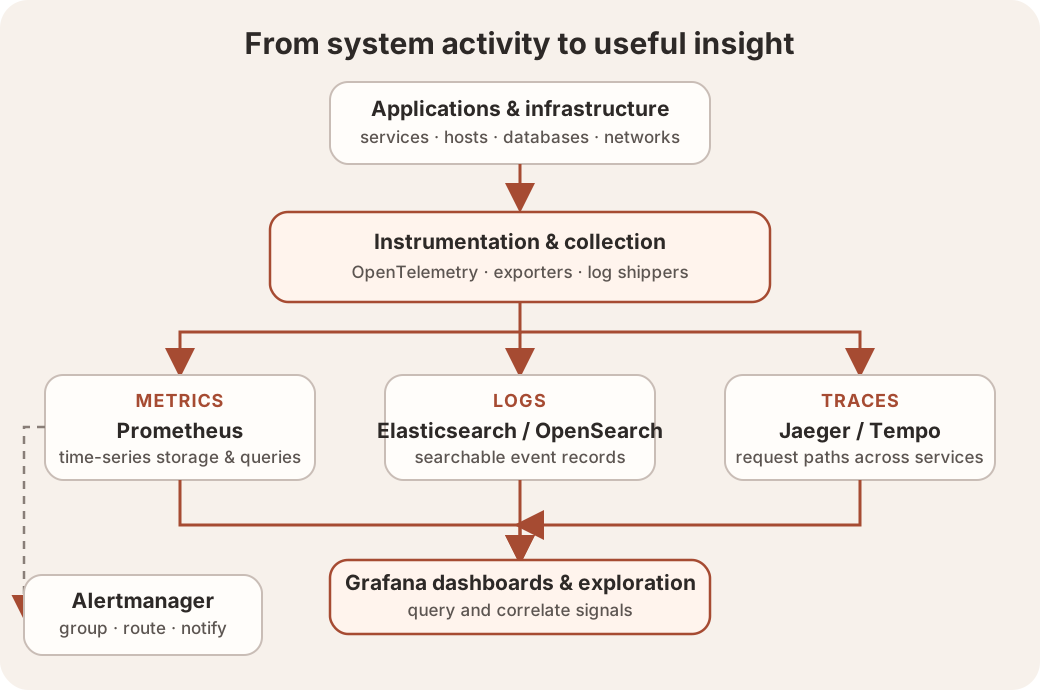
There is no single required observability stack. A common setup combines instrumentation and collection with tools that store or query each signal, plus a place to explore results and route alerts. The tools below are examples that can be composed in different ways.
- OpenTelemetry provides APIs, SDKs, and the Collector for generating, receiving, processing, and exporting telemetry. It is a vendor-neutral way to instrument applications; it is not itself a storage backend.
- Prometheus collects and stores time-series metrics, commonly by scraping HTTP endpoints. It can evaluate alert rules and query metrics with PromQL.
- Exporters expose metrics from systems that do not provide a Prometheus endpoint directly. For example, Node Exporter exposes host-level metrics, while service-specific exporters can expose database or device metrics. Application client libraries can expose application metrics directly.
- Alertmanager receives alerts from Prometheus and groups, deduplicates, silences, and routes notifications to configured destinations.
- Elasticsearch can index and search large volumes of log data. OpenSearch is another open-source search and analytics option. Log shippers such as Fluent Bit can collect and forward logs to a chosen backend.
- Jaeger or Grafana Tempo can store and query distributed traces. OpenTelemetry instrumentation and its Collector can send traces to compatible backends.
- Grafana connects to data sources such as Prometheus and log or trace backends, then lets teams explore signals, build dashboards, and configure alerts.
A small deployment might begin with application metrics, a few infrastructure exporters, and one useful dashboard. As the system grows, a team can add centralized logs, distributed tracing, and alert routing. Choose tools that fit the signals and operational needs you have; compatibility standards such as OpenTelemetry can make it easier to change backends later.
A series on the tools
This post is an overview. In upcoming blogs, I’ll take a closer look at each tool: how it works, where it fits, and how to start using it in a practical observability setup.